
Hyundai Palisade (LX2): AVN System / Roof Antenna
Components and components location
| Components |
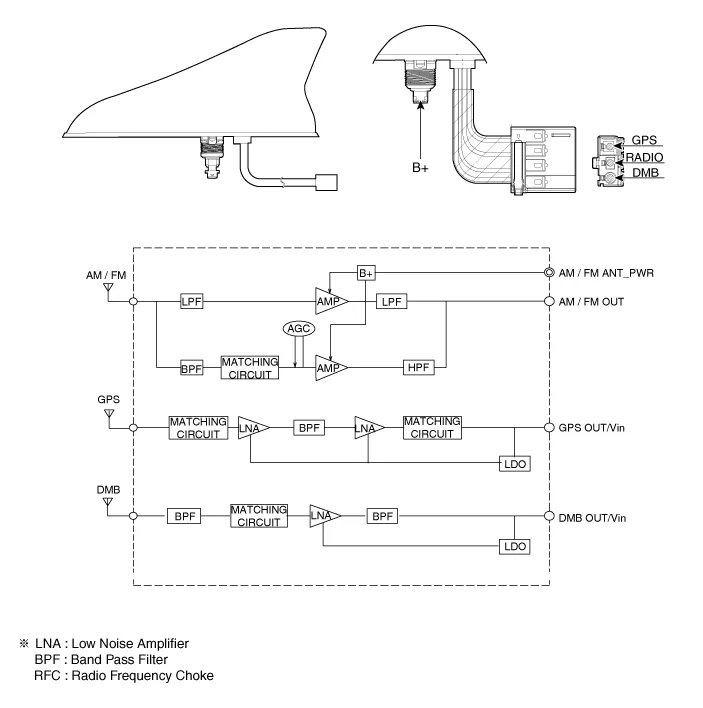
Components and components location Components Connector Pin Information No Connector A Connector B 1 Battery (+) Rear left door speaker (+) 2 Battery (+) Rear left door speaker (-) 3 Battery (+) Rear right door speaker (+) 4 Battery (+) Rear right door speaker (-) 5 - - 6 M-CAN (High) - 7 M-CAN (Low) - 8 ACC - 9 Navigation voice (+) - 10 - - 11 - - 12 Front left door speaker (+) - 13 Front left door speaker (-) Surround left speaker (+) 14 Front right door speaker (+) Surround left speaker (-) 15 Front right door speaker (-) Surround right speaker (+) 16 Ground Surround right speaker (-) 17 Ground Sub woofer speaker1 (+) 18 Ground Sub woofer speaker1 (-) 19 Ground Sub woofer speaker2 (+) 20 SPDIF (+) Sub woofer speaker2 (-) 21 SPDIF (-) - 22 SPDIF ground - 23 Navigation voice (-) - 24 IGN 1 25 Front left tweeter speaker (+) - 26 Front left tweeter speaker (-) - 27 Front right tweeter speaker (+) Center speaker (+) 28 Front right tweeter speaker (-) Center speake (-) Repair procedures Removal External Amplifier 1.
Components and components location Components Repair procedures Removal 1. Disconnct the negative (-) battery terminal.
Other information:
Hyundai Palisade (LX2) 2020-2026 Service Manual: Repair procedures
Refrigerant System Service Basics (R-134a) Refrigerant Recovery Use only service equipment that is U.L-listed and is certified to meet the requirements of SAE J2210 to remove HFC-134a(R-134a) from the air conditioning system.
Hyundai Palisade (LX2) 2020-2026 Service Manual: Description and operation
Description Rear view camera will activate when the backup light is ON with the ignition switch ON and the shift lever in the R position. This system is a supplemental system that shows behind the vehicle through the AV monitor or the ECM (Reverse Display Room Mirror) mirror while backing-up.
Categories
- Manuals Home
- Hyundai Palisade Owners Manual
- Hyundai Palisade Service Manual
- Lift and Support Points
- Troubleshooting
- Repair procedures
- New on site
- Most important about car
