
Hyundai Palisade (LX2): Smart Cruise Control With Stop & Go System / Smart Cruise Control Speed
To set Smart Cruise Control speed
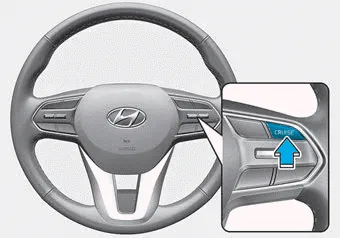
1. Push the CRUISE button on the steering wheel to turn the system on. The cruise indicator will illuminate.
2. Accelerate to the desired speed. The Smart Cruise Control speed can be set as follows:
- 5 – 100 mph (10 - 160 km/h) : when there is no vehicle in front
- 0 – 100 mph (0 - 160 km/h) : when there is a vehicle in front
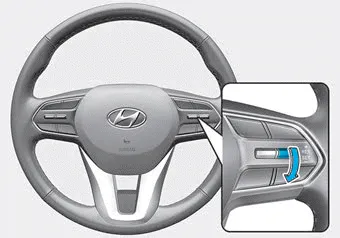
3. Push the toggle switch down (SET-). The Set Speed and Vehicle-to-Vehicle Distance on the LCD display will illuminate.
4. Release the accelerator pedal. The desired speed will automatically be maintained.
If there is a vehicle in front of you, the speed may decrease to maintain the distance to the vehicle ahead.
On a steep grade, the vehicle may slow down or speed up slightly while going uphill or downhill.
Information
- Vehicle speed may decrease on an upward slope and increase on a downward slope.
- When you are setting the cruise control speed, with a vehicle in front and your vehicle speed is between 0 ~ 20 mph (0 ~ 30 km/h ), the speed will set to 20 mph (30 km/h).
- To increase Smart Cruise Control set speed
- To decrease the Smart Cruise Control set speed
- To temporarily accelerate with the Smart Cruise Control on, Smart Cruise Control set speed will be temporarily canceled when
- To resume Smart Cruise Control set speed, To turn Cruise Control off
The driver may choose to switch to use the conventional Cruise Control mode (speed only control function) by following these steps: 1. Push the CRUISE button on the steering wheel to turn the system on.
Follow either of these procedures: Push the toggle switch up (RES+), and release it immediately. The cruising speed will increase by 1 mph (1 km/h) each time you move the toggle switch up in this manner.
Other information:
Hyundai Palisade (LX2) 2020-2026 Service Manual: Ultrasonic Sensor
Schematic diagrams Schematic Diagrams Repair procedures Removal 1. Remove the bumper cover. (Refer to Body - "Front Bumper Cover") (Refer to Body - "Rear Bumper Cover") 2.
Hyundai Palisade (LX2) 2020-2026 Service Manual: Parking/View Switch
Repair procedures Removal 1. Disconnect the negative (-) battery terminal. 2. Remove the floor console upper cover. (Refer to Body - "Floor Console Assembly") 3.
Categories
- Manuals Home
- Hyundai Palisade Owners Manual
- Hyundai Palisade Service Manual
- Engine Electrical System
- Resetting the Driver's Seat Memory System
- How to reset the power liftgate
- New on site
- Most important about car
