
Hyundai Palisade (LX2): Surround View Monitor (SVM) / Parking/View Switch
Repair procedures
| Removal |
| 1. |
Disconnect the negative (-) battery terminal.
|
| 2. |
Remove the floor console upper cover.
(Refer to Body - "Floor Console Assembly")
|
| 3. |
Remove the SVM switch after loosening the mounting screws.
|
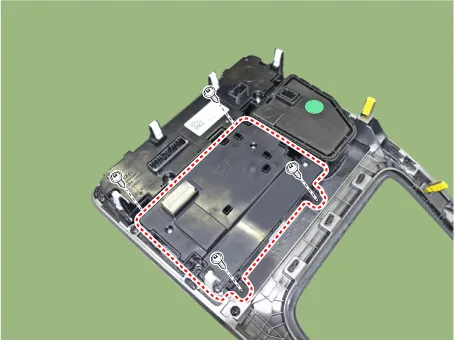
| Installation |
| 1. |
To install, reverse the removal procedure.
|
Components and components location Components [Ultra Optical Camera - RH/LH] [Ultra Optical Camera - Front] [Ultra Optical Camera - Rear] Repair procedures Removal • In case of bad quality or poor focus, be sure to check the camera lense surface condition and foreign materials.
Other information:
Hyundai Palisade (LX2) 2020-2026 Service Manual: Components and components location
Hyundai Palisade (LX2) 2020-2026 Service Manual: Ultrasonic Sensor
Schematic diagrams Schematic Diagrams Repair procedures Removal 1. Remove the bumper cover. (Refer to Body - "Front Bumper Cover") (Refer to Body - "Rear Bumper Cover") 2.
Categories
- Manuals Home
- Hyundai Palisade Owners Manual
- Hyundai Palisade Service Manual
- Engine Mechanical System
- Emergency liftgate safety release
- Engine Control/Fuel System
- New on site
- Most important about car

Copyright © 2026 www.hpalisadelx.com - 0.0173