
Hyundai Palisade (LX2): TRIP Computer (Cluster type A and type B) / Drive Info display
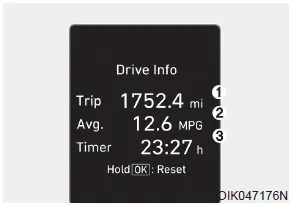
This display shows the trip distance (1), the average fuel economy (2), and the total driving time (3).
The information is combined for each ignition cycle. However, when the engine has been OFF for 4 hours or longer the Drive Info screen will reset.
To reset the details, press and hold the OK button when viewing the Drive Info. The trip distance, the average fuel economy, and total driving time will reset simultaneously.
The driving information will continue to be counted while the engine is still running (for example, when the vehicle is in traffic or stopped at a stop light).
Information
The vehicle must be driven for a minimum of 0.19 miles (300 meters) since the last ignition key cycle before the average fuel economy will be recalculated.
This display shows the accumulated trip distance (1), the average fuel economy (2), and the total driving time (3). The information is accumulated starting from the last reset.
Digital speedometer This digital speedometer display shows the speed of the vehicle. Smart shift This mode displays the currently selected drive mode.
Other information:
Hyundai Palisade (LX2) 2020-2026 Service Manual: Wireless Charging Lamp
Components and positions Components Repair procedures Removal Handling wireless charging system parts by wet hands may cause electric shock.
Hyundai Palisade (LX2) 2020-2026 Service Manual: Components and components location
Categories
- Manuals Home
- Hyundai Palisade Owners Manual
- Hyundai Palisade Service Manual
- Electrochromatic Mirror (ECM) with homelink system
- How to reset the power liftgate
- Rain Sensor
- New on site
- Most important about car
