
Hyundai Palisade (LX2): TRIP Computer (Cluster type A and type B) / Accumulated Info display
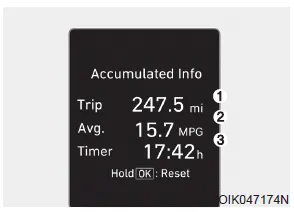
This display shows the accumulated trip distance (1), the average fuel economy (2), and the total driving time (3).
The information is accumulated starting from the last reset.
To reset the details, press and hold the OK button when viewing the Accumulated driving info. The trip distance, the average fuel economy, and total driving time will reset simultaneously.
The accumulated driving information will continue to be counted while the engine is still running (for example, when the vehicle is in traffic or stopped at a stop light).
Information
The vehicle must be driven for a minimum of 0.19 miles (300 meters) since the last ignition key cycle before the average fuel economy will be recalculated.
Average Fuel Economy (1) The average fuel economy is calculated by the total driving distance and fuel consumption since the last average fuel economy reset.
This display shows the trip distance (1), the average fuel economy (2), and the total driving time (3). The information is combined for each ignition cycle.
Other information:
Hyundai Palisade (LX2) 2020-2026 Service Manual: Auto Defogging Actuator
Description and operation Description The auto defogging sensor is installed on the front window glass. The sensor judges and sends signal if moisture occurs to blow out wind for defogging. The air conditioner control module receives a signal from the sensor and restrains moisture and eliminates defog by the intake actuato
Hyundai Palisade (LX2) 2020-2026 Service Manual: Schematic diagrams
System Block Diagram Component Parts And Function Outline Component part Function Vehicle-speed sensor, ESP/ABS Control Module Converts vehicle speed to pulse. ECM Receives signals from sensor and control switches.
Categories
- Manuals Home
- Hyundai Palisade Owners Manual
- Hyundai Palisade Service Manual
- Brake bleeding procedures
- Engine Electrical System
- Rain Sensor
- New on site
- Most important about car
