
Hyundai Palisade (LX2): Audio / Antenna
Components and components location
| Components |
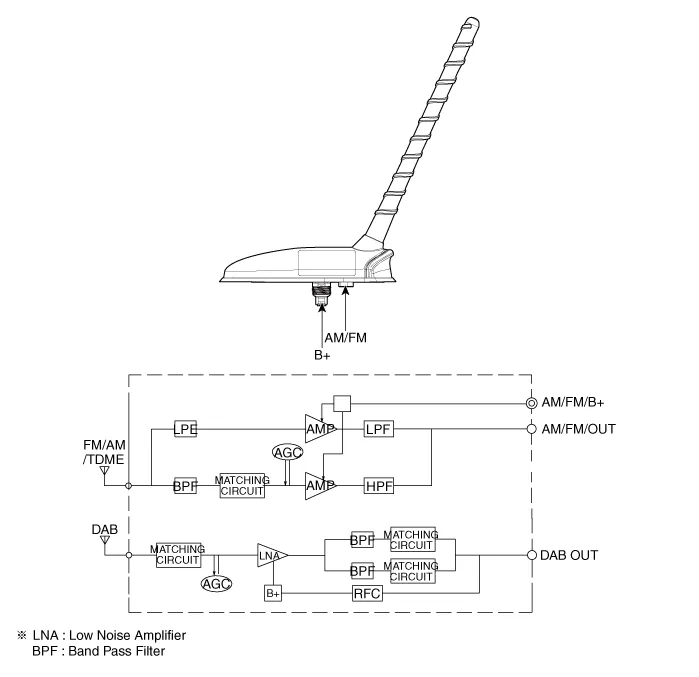
Repair procedures
| Removal |
| 1. |
Remove the roof trim assembly.
(Refer to Body - "Roof Trim Assembly")
|
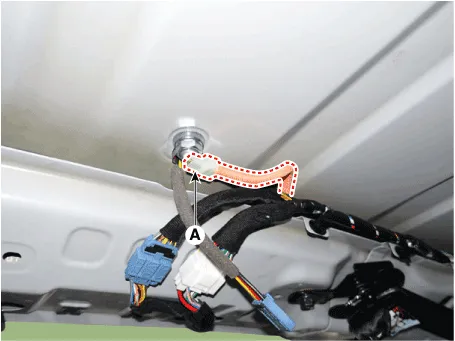
| 2. |
Disconnect the antenna connector (A).
|
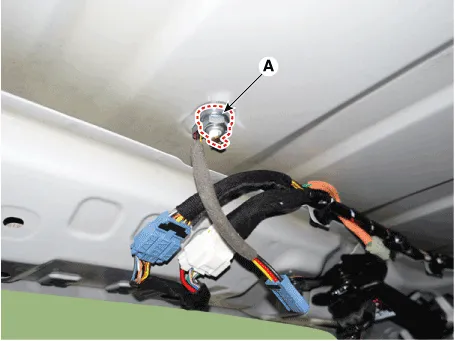
| 3. |
Loosen the mounting nut (A) and then remove the roof antenna.
|
| Installation |
| 1. |
Connect the roof antenna connectors and install the roof antenna.
|
| 2. |
Install the roof trim assembly.
|

Repair procedures Inspection 1. Troubleshooting for Speaker (1) Basic inspection of speaker Inspect the sound from speaker after verifying that the speaker mounting screws is removed and the wiring connector is connected precisely to remove vibration transmitted from body trims and surrounding parts.
Components and components location Components 1. Remote control switch (LH : Audio + Voice) 2. Remote control switch (RH : Trip + Cruise) Schematic diagrams Circuit Diagram [Audio / Bluetooth / Voice] [Trip + Cruise] [Trip + Cruise + Smart cruise] Repair procedures Inspection 1.
Other information:
Hyundai Palisade (LX2) 2020-2026 Service Manual: Ultrasonic Sensor
Schematic diagrams Schematic Diagrams Repair procedures Removal 1. Remove the bumper cover. (Refer to Body - "Front Bumper Cover") (Refer to Body - "Rear Bumper Cover") 2.
Hyundai Palisade (LX2) 2020-2026 Service Manual: Troubleshooting
Trouble Symptom Charts Trouble Symptom 1 Trouble Symptom 2 Trouble symptom Probable cause Remedy The set vehicle speed varies greatly upward or downward "Surging" (repeated alternating acceleration and deceleration) occurs after set
Categories
- Manuals Home
- Hyundai Palisade Owners Manual
- Hyundai Palisade Service Manual
- How to reset the power liftgate
- Automatic Transaxle System (A8LF1)
- Identification Numbers
- New on site
- Most important about car
