
Hyundai Palisade (LX2): Exterior Lights / High beam operation
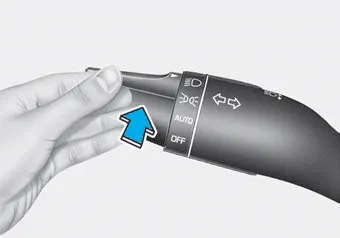
To turn on the high beam headlamp, push the lever away from you. The lever will return to its original position.
The high beam indicator will light when the headlamp high beams are switched on.
To turn off the high beam headlamp, pull the lever towards you. The low beams will turn on.
WARNING
Do not use high beam when there are other vehicles approaching you. Using high beam could obstruct the other driver's vision.
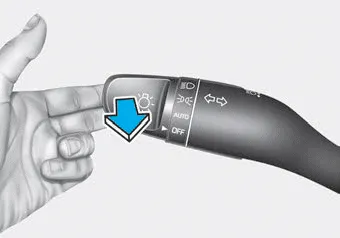
To flash the high beam headlamp, pull the lever towards you, then release the lever. The high beams will remain ON as long as you hold the lever towards you.
Lighting control To operate the lights, turn the knob at the end of the control lever to one of the following positions: 1. OFF position 2. AUTO headlamp position 3.
The High Beam Assist (HBA) is a system that automatically adjusts the headlamp range (switches between high beam and low beam) according to the brightness of other vehicles and road conditions.
Other information:
Hyundai Palisade (LX2) 2020-2026 Service Manual: Special service tools
Special Service Tools Tool Name / Number Illustration Description LKA Compensator (09890-3V100) Used for compensating front view camera unit Tolerance Compensation Plate for Surround View Monitoring (09957-CM100)
Hyundai Palisade (LX2) 2020-2026 Service Manual: Ultrasonic Sensor
Schematic diagrams Schematic Diagrams Repair procedures Removal 1. Remove the bumper cover. (Refer to Body - "Front Bumper Cover") (Refer to Body - "Rear Bumper Cover") 2.
Categories
- Manuals Home
- Hyundai Palisade Owners Manual
- Hyundai Palisade Service Manual
- How to reset the power liftgate
- Scheduled maintenance services
- Rear Heater Unit
- New on site
- Most important about car
