
Hyundai Palisade (LX2): Convenient Features of Your Vehicle / Exterior Lights
Lighting control
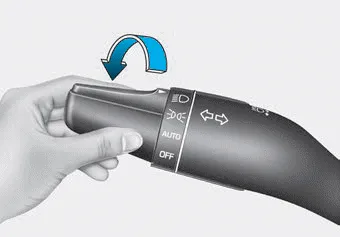
To operate the lights, turn the knob at the end of the control lever to one of the following positions:
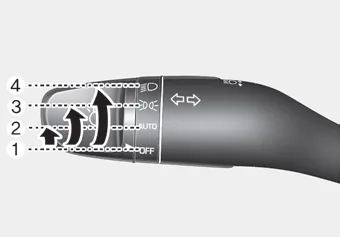
1. OFF position
2. AUTO headlamp position
3. Parking lamp position
4. Headlamp position
Daytime running light (DRL)
The Daytime Running Lights (DRL) can make it easier for others to see the front of your vehicle during the day, especially after dawn and before sunset.
The DRL system will turn the dedicated lamp OFF when :
- The headlamps are ON.
- The parking lamps are ON.
- The vehicle is turned off.
- The parking brake is engaged.
AUTO headlamp position
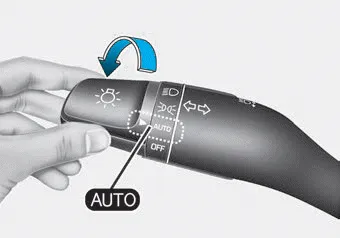
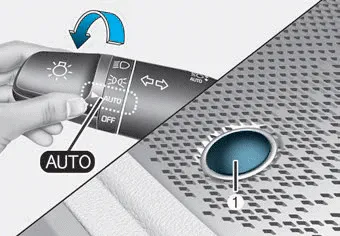
The parking lamp and headlamp will be turned ON or OFF automatically depending on the amount of daylight as measured by the ambient light sensor (1) on the center dash.
Even with the AUTO headlamp feature in operation, it is recommended to manually turn ON the headlamps when driving at night or in a fog, driving in the rain, or when you enter dark areas, such as tunnels and parking facilities.
NOTICE
- Do not cover or spill anything on the sensor (1) located in front of the instrument panel.
- Do not clean the sensor using a window cleaner, the cleanser may leave a light film which could interfere with sensor operation.
- If your vehicle has window tint or other types of metallic coating on the front windshield, the AUTO headlamp system may not work properly.
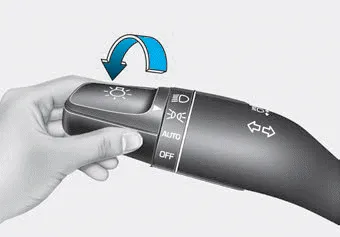
Parking lamp position ( )
)
The parking lamp, license plate lamp and instrument panel lamp are turned ON.
Headlamp position ( )
)
The headlamp, parking lamp, license plate lamp and instrument panel lamp are turned ON.
Information
The ignition switch must be in the ON position to turn on the headlamp.
- High beam operation
- High Beam Assist (HBA)
- Turn signals and lane change signals
- Battery saver function, Headlamp delay function
The Head-Up Display is an optional feature that allows the driver to view information projected onto a transparent screen while still keeping your eyes safely on the road ahead while driving.
To turn on the high beam headlamp, push the lever away from you. The lever will return to its original position. The high beam indicator will light when the headlamp high beams are switched on.
Other information:
Hyundai Palisade (LX2) 2020-2026 Service Manual: Compressor oil
Repair procedures Oil Specification 1. The R-134a or R-1234yf system requires synthetic (PAG) compressor oil whereas the R-12 system requires mineral compressor oil. The two oils must never be mixed. 2.
Hyundai Palisade (LX2) 2020-2026 Service Manual: Schematic diagrams
System Block Diagram Component Parts And Function Outline Component part Function Vehicle-speed sensor, ESP/ABS Control Module Converts vehicle speed to pulse. ECM Receives signals from sensor and control switches.
Categories
- Manuals Home
- Hyundai Palisade Owners Manual
- Hyundai Palisade Service Manual
- Rain Sensor
- Repair procedures
- Electrochromatic Mirror (ECM) with homelink system
- New on site
- Most important about car
