
Hyundai Palisade (LX2): Convenient Features of Your Vehicle / Head up display (HUD)

The Head-Up Display is an optional feature that allows the driver to view information projected onto a transparent screen while still keeping your eyes safely on the road ahead while driving.
Precautions while using the head up display
It may sometimes be difficult to read information on the head up display in the following situations.
- The driver is improperly positioned
in the driver's seat.
- The driver wears polarizing-filter
sunglasses.
- An object is located above the
head up display cover.
- The vehicle is driven on a wet road.
- Any improper lighting accessory is
installed inside the vehicle, or there
is incoming light from outside of
the vehicle.
- The driver wears glasses.
- The driver wears contact lenses.
When it is difficult to read the head up display information, adjust the head up display angle or the head up display brightness level in the User Settings mode. For more details, refer to "LCD Display" in this chapter.
WARNING
- Do not tint the front windshield glass or add other types of metallic coating. Otherwise, the head up display image may be invisible.
- Do not place any accessories on the crash pad or attach any objects on the windshield glass.
- The Blind-spot Collision Warning (BCW) system warnings on the head up display are supplemental. Do not solely depend on them to change lanes. Always take a look around before changing lanes.
NOTICE
When replacing the front windshield glass of the vehicle equipped with the head up display, replace it with a windshield glass designed for the head up display operation. Otherwise, duplicated images may be displayed on the windshield glass.
Head-up display ON/OFF
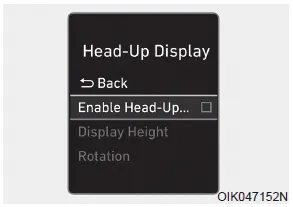
To activate the head up display, select 'Head-UP Display' on the User Settings mode on the instrument cluster LCD display.
If you do not select 'Head-Up Display', the head up display will be deactivated.
Head-up display information
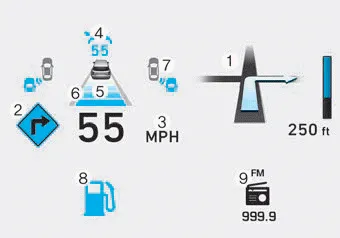
1. Turn By Turn (TBT) navigation information
(if equipped)
2. Speed limit signs (if equipped)
3. Speedometer
4. Cruise setting speed (if equipped)
5. Smart Cruise Control (SCC) information
(if equipped)
6. Lane Keeping Assist (LKA) system
information (if equipped)
7. Blind-spot Collision Warning (BCW)
system information (if equipped)
8.Warning lights (Low fuel, etc.)
9. Audio/Video information
Information
If you select the Turn By Turn (TBT) navigation information as HUD contents, the Turn By Turn (TBT) navigation information will not be displayed in the instrument cluster LCD display.
Head-up display setting
On the LCD display, you can change the head up display settings as follows.
- Enable Head-up display
- Display Height
- Rotation
- Brightness
- Content Selection
- Speed Size
- Speed Color
WARNING While driving, please do not change the setting mode. It may distract your attention and cause the accident. NOTICE Displayed items of user's setting may differ from the content in this owner's manual since the contents vary with the vehicle’s technical specifications.
Lighting control To operate the lights, turn the knob at the end of the control lever to one of the following positions: 1. OFF position 2. AUTO headlamp position 3.
Other information:
Hyundai Palisade (LX2) 2020-2026 Service Manual: Compressor
Description and operation Description The compressor is the power unit of the A/C system. It is located on the side of engine block and driven by a V-belt of the engine. The compressor changes low pressure and low temperature refrigerant gas into high pressure and high temperature refrigerant gas.
Hyundai Palisade (LX2) 2020-2026 Service Manual: Heater & A/C Control Unit (Rear)
Components and components location Component Connector Pin Function Connector PIN No Pin Function Connector PIN No Pin Function A 1 Battery A 17 IGN2 2
Categories
- Manuals Home
- Hyundai Palisade Owners Manual
- Hyundai Palisade Service Manual
- Repair procedures
- Automatic Transaxle Fluid (ATF)
- Scheduled maintenance services
- New on site
- Most important about car
