
Hyundai Palisade (LX2): Body Side Molding / Door Garnish
Repair procedures
| Replacement |
|

| 1. |
Loosen the mounting nuts and remove the front door garnish (A).
|
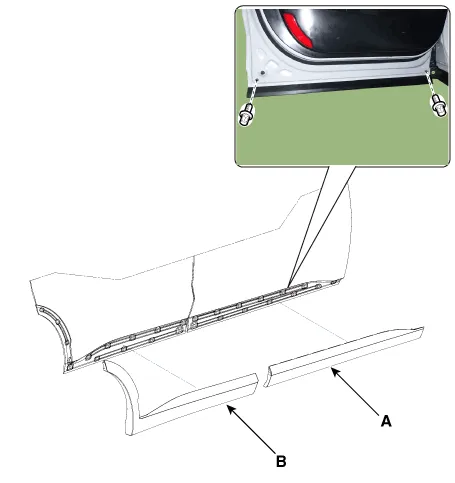
| 2. |
To install, reverse removal procedure.
|

|

| 1. |
Loosen the mounting nuts and remove the rear door garnish (A).
|
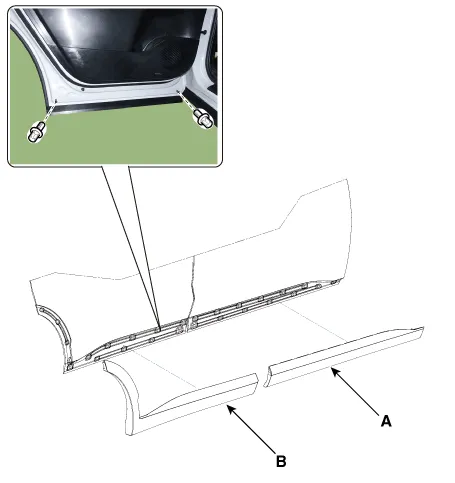
| 2. |
To install, reverse removal procedure.
|

Repair procedures Replacement • When removing with a flat-tip screwdriver or remover, wrap protective tape around the tools to prevent damage to components.
Other information:
Hyundai Palisade (LX2) 2020-2026 Service Manual: Specifications
Specification Air Conditioner Item Specification Compressor Type 7VSX18 (External Variable Displacement Swash Plate) Oil type & Capacity PAG 180 ± 10cc (6.
Hyundai Palisade (LX2) 2020-2026 Service Manual: Rear Heater Unit
Components and components location Component Location 1. Rear Heater & A/C Unit Repair procedures Replacement • Be careful not to damage the parts located under the vehicle
Categories
- Manuals Home
- Hyundai Palisade Owners Manual
- Hyundai Palisade Service Manual
- Resetting the Driver's Seat Memory System
- Engine Mechanical System
- How to reset the power liftgate
- New on site
- Most important about car
