
Hyundai Palisade (LX2): Power Windows / Power Window Motor
Components and components location
| Components |
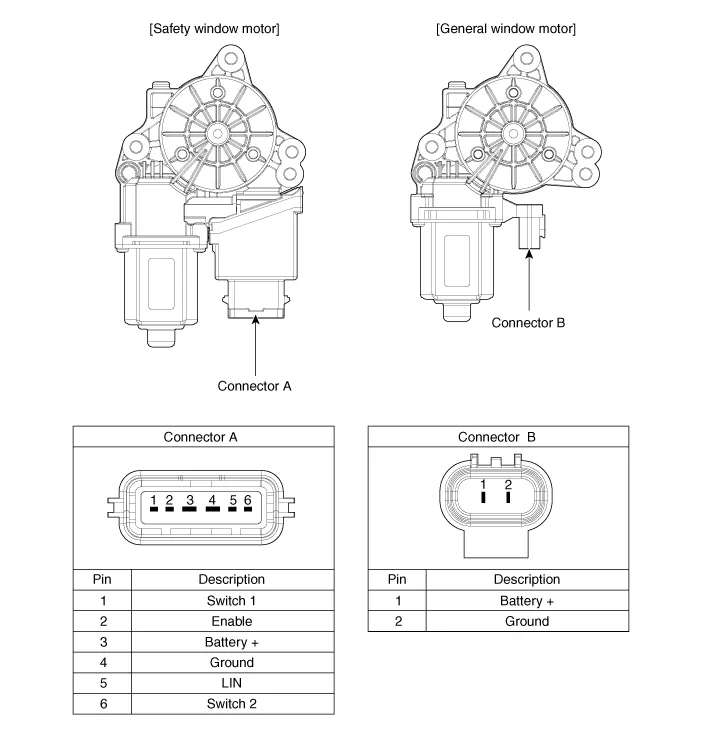
Repair procedures
| Inspection |
| 1. |
Disconnect the negative (-) battery terminal.
|
| 2. |
Remove the front door trim.
(Refer to Body - "Front Door Trim")
|
| 3. |
Disconnect the connector (A) from the motor.
(A : Safety, B : Standard)
|
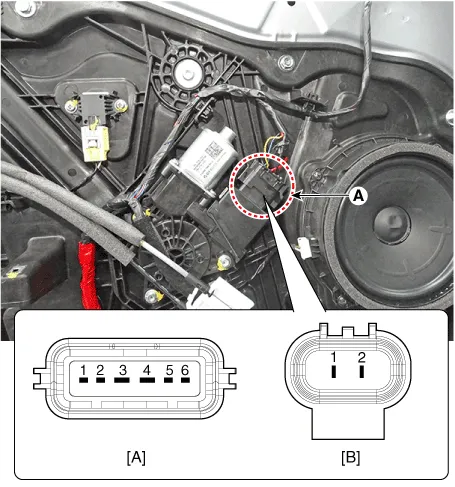
| 4. |
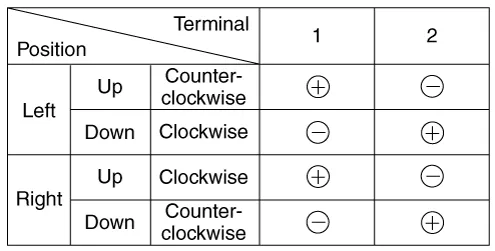
Connect the motor terminals directly to battery voltage (12V) and check
that the motor operates smoothly. Next, reverse the polarity and check
that the motor operates smoothly in the reverse direction. If the operation
is abnormal, replace the motor.
[Standard Window motor]
|
| 5. |
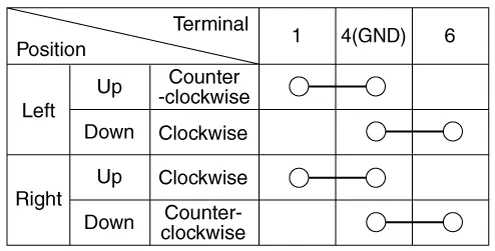
Connect the terminal No. 2 and No. 3 to battery voltage (12V) and check
that the motor operates smoothly when connecting the terminals below.
[Safety Window motor]
|
| 1. |
Disconnect the negative (-) battery terminal.
|
| 2. |
Remove the rear door trim.
(Refer to Body - "Rear Door Trim")
|
| 3. |
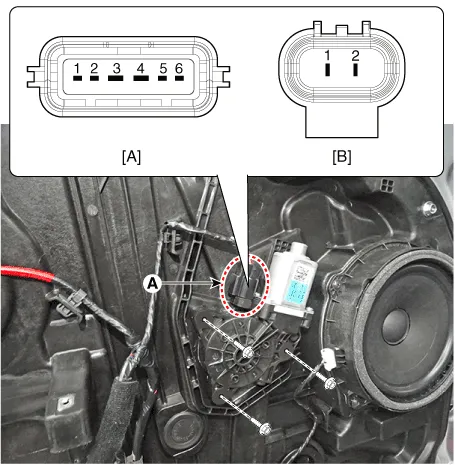
Disconnect the connector (A) from the motor.
(A : Safety, B : Standard)
|
| 4. |
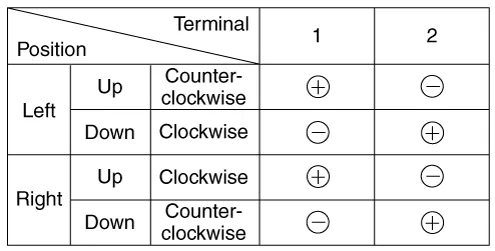
Connect the motor terminals directly to battery voltage (12V) and check
that the motor operates smoothly. Next, reverse the polarity and check
that the motor operates smoothly in the reverse direction. If the operation
is abnormal, replace the motor.
[Standard Window motor]
|
| 5. |
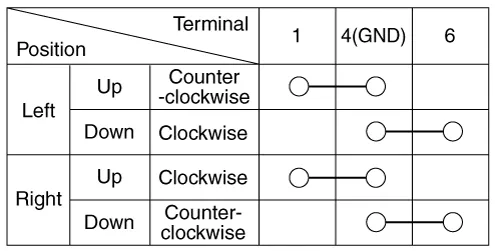
Connect the terminal No. 2 and No. 3 to battery voltage (12V) and check
that the motor operates smoothly when connecting the terminals below.
[Safety Window motor]
|
Function Of Safety Power Window When driver door power window auto-up switch is operated, safety function is activated. 1.
Components and components location Components Driver Power Window Switch Assist Power Window Switch Rear Power Window Switch Schematic diagrams Circuit Diagram [Driver Power Window Switch] Driver safety switch Front safety switch ALL safety switch [Assist Power Window Switch] [Rear Power Window Switch] Repair procedures Diagnosis with Diagnostic tool Diagnosis with Diagnostic tool 1.
Other information:
Hyundai Palisade (LX2) 2020-2026 Service Manual: Heater Core
Repair procedures Replacement 1. Disconnect the negative (-) battery terminal. 2. Remove the heater and blower assembly. (Refer to Heater - "Heater Unit") 3.
Hyundai Palisade (LX2) 2020-2026 Service Manual: Description and operation
Description Blind-Spot Radar is a system that measures the relative speed and distance from the following vehicles by using two electromagnetic wave radar sensors attached to the rear bumper, and detects any vehicle within the blind spot zone and gives off alarm (visual and auditory).
Categories
- Manuals Home
- Hyundai Palisade Owners Manual
- Hyundai Palisade Service Manual
- Electronic Child Safety Lock System
- PTG Spindle
- Brake bleeding procedures
- New on site
- Most important about car
