
Hyundai Palisade (LX2): Rear Cross-Traffic Collision Warning (RCCW)/ Rear Cross-Traffic Collision-Avoidance Assist (RCCA) / System Setting and Operation
System setting
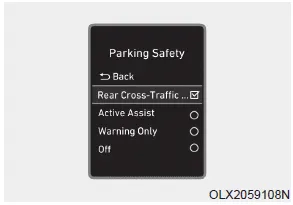
- Setting Parking Safety function The driver can activate the systems by placing the ignition switch to the ON position and by selecting 'User Settings → Driver Assistance → Parking Safety → Rear Cross- Traffic Safety'. The RCCA and RCCW turn on and get ready to be activated when 'Rear Cross-Traffic Safety' is selected.
- When the engine is turned off then on again, the systems will be ready to be operated.
- When the system is initially turned on and engine is turned off then on again, the warning light will illuminate for 3 seconds on the side view mirror.
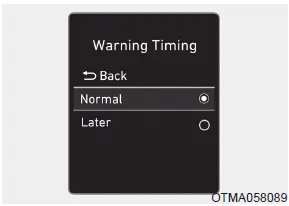
• Setting Warning Timing
The driver can select the initial warning activation time in the User Settings in the LCD display by selecting 'User Settings → Driver Assistance → Warning Timing'.
The options for the initial Rear Cross-Traffic Collision Warning includes the following:
- Normal:
When this option is selected, the initial Rear Cross-Traffic Collision Warning is activated normally. If this setting feels sensitive, change the option to 'Later'.
The warning activation time may feel late if the a vehicle at the side or rear abruptly accelerates.
- Later:
Select this warning activation time when the traffic is light and you are driving at low speeds.
Information
If you change the warning timing, the warning time of other systems may change. Always be aware before changing the warning timing
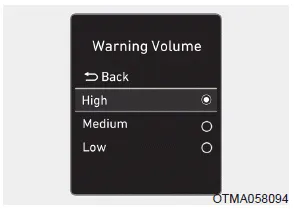
• Setting Warning Volume
The driver can select the warning volume of the Rear Cross-Traffic Collision Warning by selecting 'User Settings → Driver Assistance → Warning Volume → High/ Medium/Low'.
Information
If you change the warning volume, the warning volume of other systems may change. Always be aware before changing the warning volume.
Operating conditions
To operate:
Go to the 'User Settings → Driver Assistance → Parking Safety → Rear Cross-Traffic Safety' in the cluster LCD display. The system will turn on and standby to activate.
The system will operate when vehicle speed is below 6 mph (10 km/h) and with the gear in R (Reverse).
* The system will not operate when the vehicle speed exceeds 6 mph (10 km/h). The system will operate again when the speed is below 6 mph (10 km/h).
The system's detecting range is approximately 1 – 65 ft. (0.5 – 20 m). An approaching vehicle will be detected if the vehicle speed is within 5 – 22.5 mph (8 – 36 km/h).
Note that the detecting range may vary under certain conditions. As always, use caution and pay close attention to your surroundings when backing up your vehicle.
System Description Rear Cross-Traffic Collision Warning (RCCW) system The Rear Cross-Traffic Collision Warning (RCCW) system uses radar sensors to monitor the approaching cross traffic from the left and right side of the vehicle when your vehicle is in reverse.
Rear Cross-Traffic Collision Warning (RCCW) system â– Left â– Right â– Left â– Right If the vehicle detected by the sensors approaches from the rear left/right side of your vehicle, the warning chime will sound, the warning light on the outer side view mirror will blink and a warning will appear on the LCD display.
Other information:
Hyundai Palisade (LX2) 2020-2026 Service Manual: Repair procedures
Inspection 1. Turn the ignition switch ON. 2. Manually operate the control switch and measure the voltage of the blower motor. 3. Select the control switch to raise the voltage until it reaches high speed.
Hyundai Palisade (LX2) 2020-2026 Service Manual: Smart Cruise Control (SCC) Switch
Components and components location Components 1. Remote control switch (Audio swtich) 2. Remote control switch (Cruise control switch) Schematic diagrams Circuit Diagram Trip + SCC Repair procedures Removal 1.
Categories
- Manuals Home
- Hyundai Palisade Owners Manual
- Hyundai Palisade Service Manual
- How to reset the power liftgate
- Emergency liftgate safety release
- Rain Sensor
- New on site
- Most important about car
