
Hyundai Palisade (LX2): Smart Key / Battery replacement
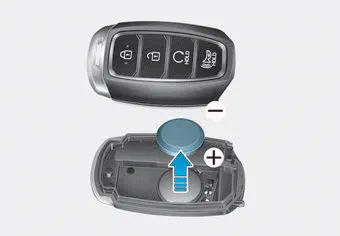
If the Smart Key is not working properly, try replacing the battery with a new one.
Battery Type: CR2032 To replace the battery:
1.Remove the mechanical key.
2.Use a slim tool to pry open the rear cover of the smart key.
3.Remove the old battery and insert the new battery. Make sure the battery position is correct.
4.Reinstall the rear cover of the smart key.
If you suspect your smart key might have sustained some damage, or you feel your smart key is not working correctly, contact an authorized HYUNDAI dealer.
Information
An inappropriately disposed battery can be harmful to the environment and human health. Dispose of the battery according to your local law(s) or regulations.
Loss of a smart key A maximum of two Smart Keys can be registered to a single vehicle. If you happen to lose your smart key, you should immediately take the vehicle and remaining keys to your authorized HYUNDAI dealer or tow the vehicle, if necessary.
The immobilizer system protects your vehicle from theft. If an improperly coded key (or other device) is used, the engine's fuel system is disabled.
Other information:
Hyundai Palisade (LX2) 2020-2026 Service Manual: Description and operation
Description Surround View Monitor (SVM) is the system that allows video monitoring of 360 degrees around the vehicle. The system includes 4 ultra optical camera mounted around the vehicle (front, both sides, rear). The video from these cameras are applied with distortion compensation, time point conversion, and video me
Hyundai Palisade (LX2) 2020-2026 Service Manual: Schematic diagrams
System Block Diagram Component Parts And Function Outline Component part Function Vehicle-speed sensor, ESP/ABS Control Module Converts vehicle speed to pulse. ECM Receives signals from sensor and control switches.
Categories
- Manuals Home
- Hyundai Palisade Owners Manual
- Hyundai Palisade Service Manual
- Automatic Transaxle Fluid (ATF)
- Engine Mechanical System
- Resetting the Driver's Seat Memory System
- New on site
- Most important about car
