
Hyundai Palisade (LX2): Heater / Auto Defogging Actuator
Description and operation
| Description |
Components and components location
| Components Location |
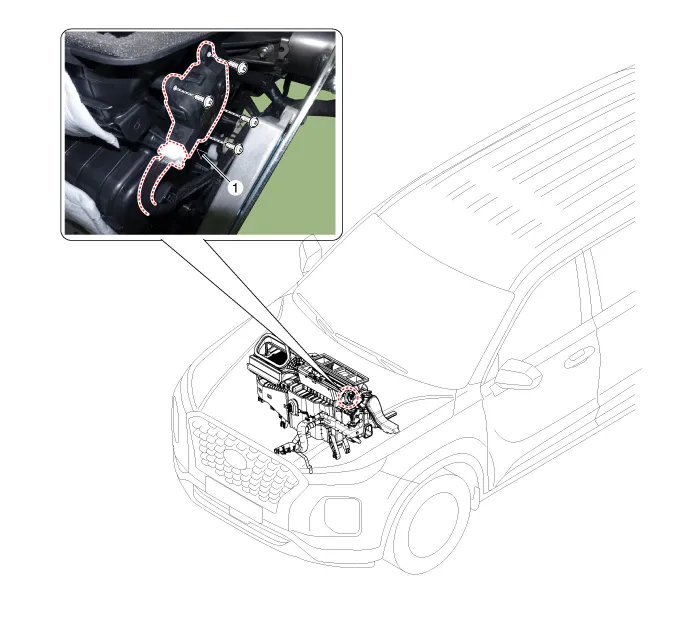
| 1. Auto defogging actuator |
Repair procedures
| Inspection |
| 1. |
Turn the ignition switch OFF.
|
| 2. |
Disconnect the auto defogging connector.
|
| 3. |
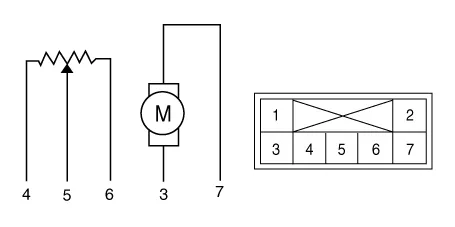
Verify that the auto defogging actuator operates to the open position
when connecting 12V to terminal 3 and grounding terminal 6.
Verify that the auto defogging actuator operates to the close position
when connected in reverse.
|
| 4. |
Connect the auto defogging actuator connector.
|
| 5. |
Turn the ignition switch ON.
|
| 6. |
Check the voltage between terminals 5 and 4.
Specification
|

| 7. |
If the measured voltage is not within specification, check the operation
by replacing the existing auto defogging actuator with a new genuine
part. After that, determine whether replacement of the auto defogging
actuator is required or not.
|
| Replacement |
| 1. |
Disconnect the negative (-) battery terminal.
|
| 2. |
Remove the main crash pad assembly.
(Refer to Body - "Main Crash Pad Assembly")
|
| 3. |
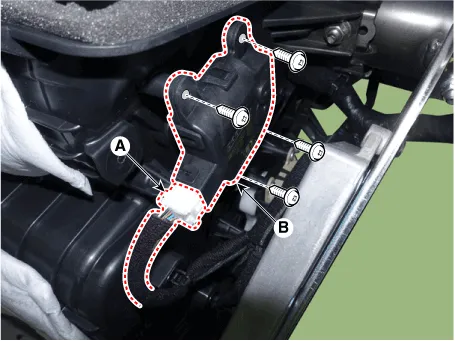
Press the lock pin and separate the connector (A) and loosen the mounting
screws and remove the auto defogging actuator (B).
|
| 4. |
Install in the reverse order of removal.
|
Description and operation Description The mode control actuator is located at the heater unit. It adjusts the position of the mode door by operating the mode control actuator based on the signal of the A/C control unit.
Other information:
Hyundai Palisade (LX2) 2020-2026 Service Manual: Wireless Power Charging Unit
Components and positions Components Circuit diagram Circuit Diagram Repair procedures Removal Handling wireless charging system parts by wet hands may cause electric shock.
Hyundai Palisade (LX2) 2020-2026 Service Manual: Troubleshooting
Troubleshooting 1) After replacing H/UNIT, always check that the system operates properly. 2) If the failure persists after replacing the H/UNIT, do not replace the unit.
Categories
- Manuals Home
- Hyundai Palisade Owners Manual
- Hyundai Palisade Service Manual
- Identification Numbers
- Troubleshooting
- Engine Control/Fuel System
- New on site
- Most important about car
