
Hyundai Palisade (LX2): Exterior Lights / Turn signals and lane change signals
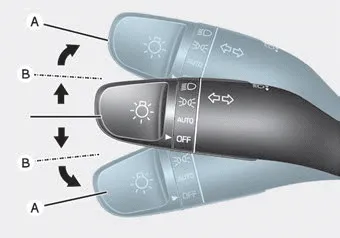
To signal a turn, push down on the lever for a left turn or up for a right turn in position (A).
If an indicator stays on and does not flash or if it flashes abnormally, one of the turn signal bulbs may be burned out and will require replacement.
One-touch turn signal function
To activate the One Touch Turn Signal function, push the turn signal lever up or down to position (B) and then release it.
The lane change signals will blink 3, 5 or 7 times.
You can activate or deactivate the One Touch Turn Signal function or choose the number of blinks (3, 5, or 7) from the User Settings mode in the LCD display.
The High Beam Assist (HBA) is a system that automatically adjusts the headlamp range (switches between high beam and low beam) according to the brightness of other vehicles and road conditions.
Battery saver function The purpose of this feature is to help prevent the battery from being discharged. The system automatically turns off the parking lamp when the driver turns the vehicle off and opens the driver-side door.
Other information:
Hyundai Palisade (LX2) 2020-2026 Service Manual: Refrigerant Line
Components and components location Components [Isometric view] 1. Front suction & Liquid pipe assembly [Top view] 1. Front suction & Liquid pipe assembly Repair procedures Replacement [Front suction & Liquid pipe assem
Hyundai Palisade (LX2) 2020-2026 Service Manual: Compressor
Description and operation Description The compressor is the power unit of the A/C system. It is located on the side of engine block and driven by a V-belt of the engine. The compressor changes low pressure and low temperature refrigerant gas into high pressure and high temperature refrigerant gas.
Categories
- Manuals Home
- Hyundai Palisade Owners Manual
- Hyundai Palisade Service Manual
- Electrochromatic Mirror (ECM) with homelink system
- Rear Heater Unit
- General Tightening Torque Table
- New on site
- Most important about car
