
Hyundai Palisade (LX2): Automatic climate control system / Automatic Temperature Control Mode
The Automatic Climate Control System is controlled by setting the desired temperature.
For your convenience and to improve the efficiency of the climate control, use the AUTO button and set the temperature to 72°F (22°C).
1. Press the AUTO button (3).
The modes, fan speeds, air intake and air-conditioning will be controlled automatically by the temperature setting you select.
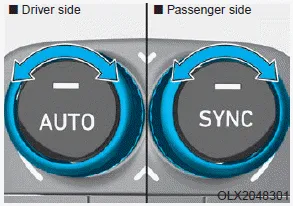
2. To select a different set point, turn the temperature control knob to the desired temperature. If the temperature is set to the lowest setting (Lo), the air conditioning system will operate continuously. After the interior has cooled sufficiently, adjust the knob to a higher temperature set point whenever possible.
To turn the automatic operation off, select any button of the following:
- Mode selection button
- Front windshield defroster button
(Press the button one more time to
deselect the front windshield
defroster function. The 'AUTO' sign
will illuminate on the information
display once again.)
- Fan speed control button
The selected function will be controlled manually while other functions operate automatically.
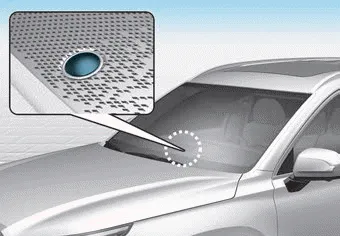
NOTICE
Never place anything near the ambient light/solar sensor to ensure better control of the heating and cooling system.
Front 1. Driver’s temperature control knob 2. Passenger’s temperature control knob 3. AUTO (automatic control) button 4. SYNC button 5. OFF button 6.
The heating and cooling system can be controlled manually by pushing buttons other than the AUTO button. In this case, the system works sequentially according to the order of buttons selected.
Other information:
Hyundai Palisade (LX2) 2020-2026 Service Manual: Rear Corner Radar Unit
Specifications Specifications [BCW, BCA] Items Blind-Spot Collision Warning (BCW) Blind-Spot Collision- Avoidance Assist (BCA) Rated voltage DC 12V Operating voltage 9V - 16V Operating speed 30 km/h
Hyundai Palisade (LX2) 2020-2026 Service Manual: Description and operation
Description Rear view camera will activate when the backup light is ON with the ignition switch ON and the shift lever in the R position. This system is a supplemental system that shows behind the vehicle through the AV monitor or the ECM (Reverse Display Room Mirror) mirror while backing-up.
Categories
- Manuals Home
- Hyundai Palisade Owners Manual
- Hyundai Palisade Service Manual
- Automatic Transaxle System (A8LF1)
- Resetting the Driver's Seat Memory System
- Components and components location
- New on site
- Most important about car
