
Hyundai Palisade (LX2): Convenient Features of Your Vehicle / LCD Display (Cluster type A and type B)
LCD Display Control
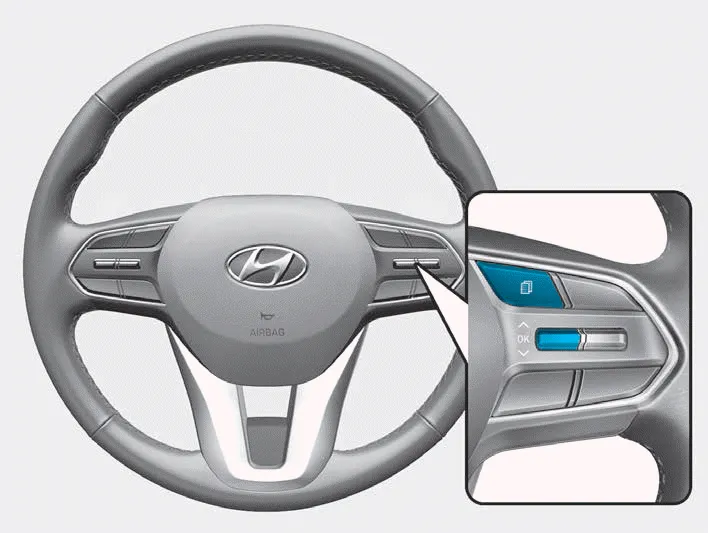
The LCD display modes can be changed by using the control buttons.
(1)  : MODE button for changing
modes
: MODE button for changing
modes
(2)  ,
,
 : MOVE switch for
changing items
: MOVE switch for
changing items
(3) OK : SELECT/RESET button for setting or resetting the selected item
Shift to P or N to start engine (for smart key system) This warning message is displayed if you try to start the engine with the shift button not in the P (Park) or N (Neutral) position.
Other information:
Hyundai Palisade (LX2) 2020-2026 Service Manual: Rear Heater Unit
Components and components location Component Location 1. Rear Heater & A/C Unit Repair procedures Replacement • Be careful not to damage the parts located under the vehicle
Hyundai Palisade (LX2) 2020-2026 Service Manual: Repair procedures
Replacement 1. Disconnect the negative (-) battery terminal. 2. Remove the luggage side trim (Refer to Body - "Luggage Side Trim ") 3. Separate the rear mode actuator connector (A), loosen the mounting screws and remove the rear mode ac
Categories
- Manuals Home
- Hyundai Palisade Owners Manual
- Hyundai Palisade Service Manual
- Scheduled maintenance services
- Resetting the Driver's Seat Memory System
- Automatic Transaxle System (A8LF1)
- New on site
- Most important about car
