
Hyundai Palisade (LX2): AVN System / AVN Head Unit
Components and components location
| Components |
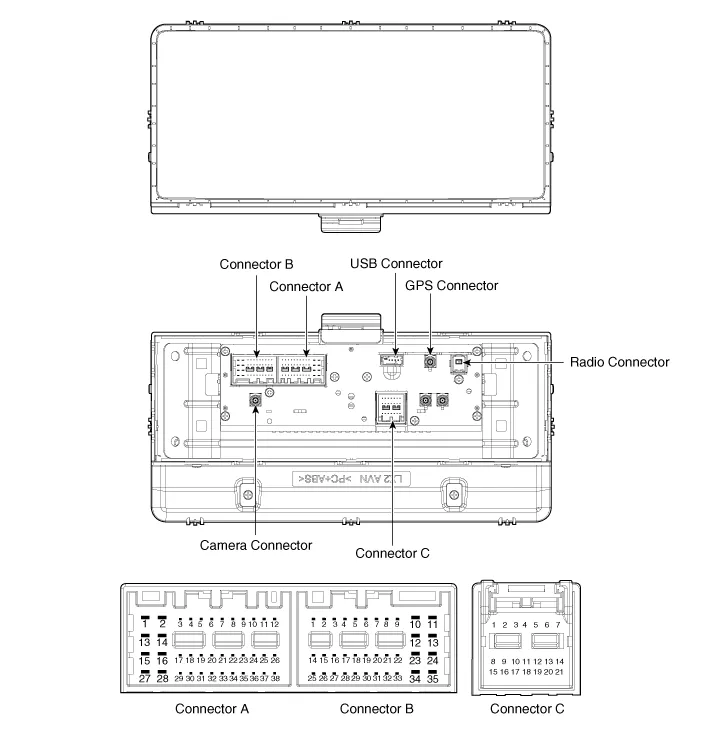
|
No |
Connector A (ExternalAmplifier) |
Connector A (Internal Amplifier) |
Connector B |
Connector C |
|
1 |
- |
Rear door speaker LH (+) |
- |
- |
|
2 |
- |
Rear door speaker LH (-) |
Mic (+) |
I_CAN (High) |
|
3 |
Navigation voice (+) |
- |
- |
- |
|
4 |
External amplifier SPDIF (+) |
- |
- |
- |
|
5 |
Reset |
Reset |
Antenna dummy power |
- |
|
6 |
RVM : Camera Power , SVM : - |
RVM : Camera Power , SVM : - |
Illumination (+) |
- |
|
7 |
RVM : Camera Video , SVM : - |
RVM : Camera Video , SVM : - |
M-CAN (High) |
- |
|
8 |
- |
- |
- |
- |
|
9 |
- |
- |
- |
- |
|
10 |
- |
- |
Battery (+) |
- |
|
11 |
AUX DETECT |
AUX DETECT |
Battery (+) |
- |
|
12 |
Steering wheel remote |
Steering wheel remote |
Ground |
- |
|
13 |
- |
Front door speaker LH (+) |
Ground |
- |
|
14 |
- |
Front door speaker LH (-) |
- |
- |
|
15 |
- |
Front door speaker RH (-) |
Mic (-) |
- |
|
16 |
- |
Front door speaker RH (+) |
- (SVM type:SVM Detect2) |
MTS Key |
|
17 |
Navigation voice (-) |
- |
- |
- |
|
18 |
External amplifier SPDIF (-) |
- |
- |
- |
|
19 |
External amplifier SPDIF (Ground) |
- |
Illumination (-) |
- |
|
20 |
RVM : Camera Power GND , SVM : - |
RVM : Camera Power GND , SVM : - |
M-CAN (Low) |
- |
|
21 |
RVM : Camera Video GND , SVM : - |
RVM : Camera Video GND , SVM : - |
- |
- |
|
22 |
- |
- |
ACC |
|
|
23 |
- |
- |
Keyboard Power |
|
|
24 |
- |
- |
- |
|
|
25 |
- |
- |
- |
|
|
26 |
Steering wheel remote ground |
Steering wheel remote ground |
- |
|
|
27 |
- |
Rear door speaker RH (-) |
- |
|
|
28 |
- |
Rear door speaker RH (+) |
- |
|
|
29 |
- |
- |
- |
|
|
30 |
- |
- |
- |
|
|
31 |
- |
- |
- |
|
|
32 |
SVM DETECT 1 |
SVM DETECT 1 |
- |
|
|
33 |
RVM : Camera Shield GND , SVM : - |
RVM : Camera Shield GND , SVM : - |
IGN 1 |
|
|
34 |
- |
- |
Keyboard GND |
|
|
35 |
- |
- |
- |
|
|
36 |
- |
- |
|
|
|
37 |
- |
- |
||
|
38 |
Vehicle speed |
Vehicle speed |
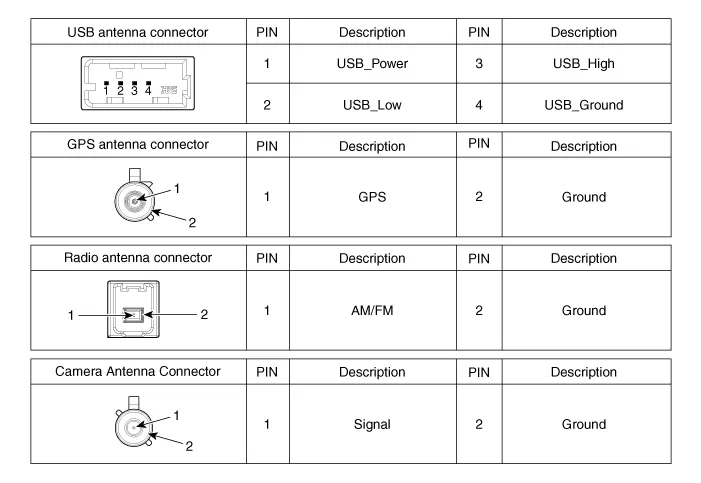
Repair procedures
| Removal |
| 1. |
Disconnect the negative (-) battery terminal.
|
| 2. |
Remove the center fascia panel.
(Refer to Body - "Center Fascia Panel")
|
| 3. |
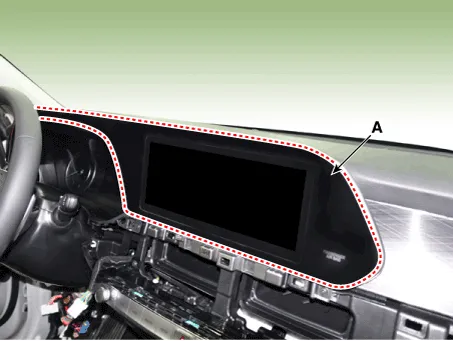
Using a flat-head screwdriver, remove the monitor cover (A).
|
| 4. |
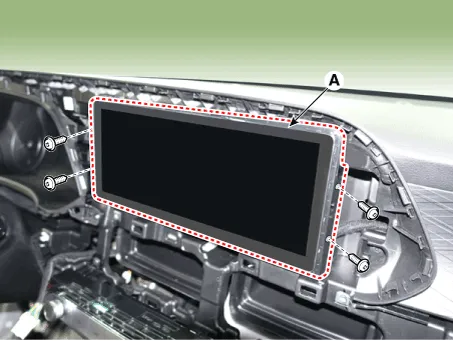
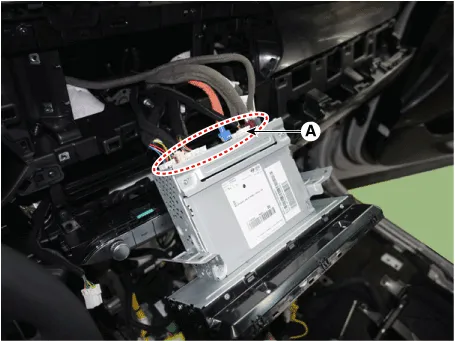
Remove the AVN head unit (A) after loosening mounting screws.
|
| 5. |
Remove the AVN head unit (A) after disconnecting the connectors and
cable.
|
| Installation |
| 1. |
Connect the audio unit connectors.
|
| 2. |
Install the AVN head unit.
|
| 3. |
Install the monitor cover.
|
| 4. |
Install the center fascia panel.
|
| 5. |
Connect the negative (-) battery terminal.
|

Description AVN system The AVN system has improved information search and easiness of manipulation for the driver by simplifying the system operation experience and unifying the display of the user information such as multimedia and car information.
Repair procedures Inspection 1. Troubleshooting for Speaker (1) Basic inspection of speaker Inspect the sound from speaker after verifying that the speaker mounting screws are removed and the wiring connector is connected to remove any possible vibration transmitted from body trims and surrounding parts.
Other information:
Hyundai Palisade (LX2) 2020-2026 Service Manual: Description and operation
Description Surround View Monitor (SVM) is the system that allows video monitoring of 360 degrees around the vehicle. The system includes 4 ultra optical camera mounted around the vehicle (front, both sides, rear). The video from these cameras are applied with distortion compensation, time point conversion, and video me
Hyundai Palisade (LX2) 2020-2026 Service Manual: Surround View Monitor (SVM) Camera
Components and components location Components [Ultra Optical Camera - RH/LH] [Ultra Optical Camera - Front] [Ultra Optical Camera - Rear] Repair procedures Removal • In case of bad quality or poor
Categories
- Manuals Home
- Hyundai Palisade Owners Manual
- Hyundai Palisade Service Manual
- Troubleshooting
- Electrochromatic Mirror (ECM) with homelink system
- Rear Heater Unit
- New on site
- Most important about car
