
Hyundai Palisade (LX2): Audio / USB jack
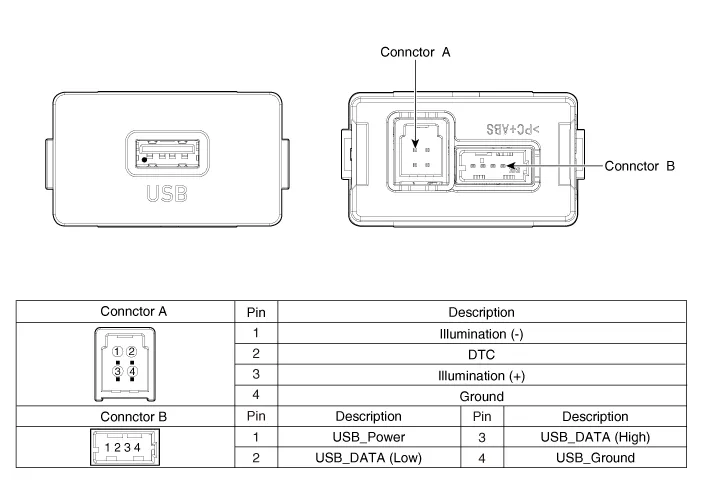
Schematic diagrams
| Circuit Diagram |
Description and operation
| Description |
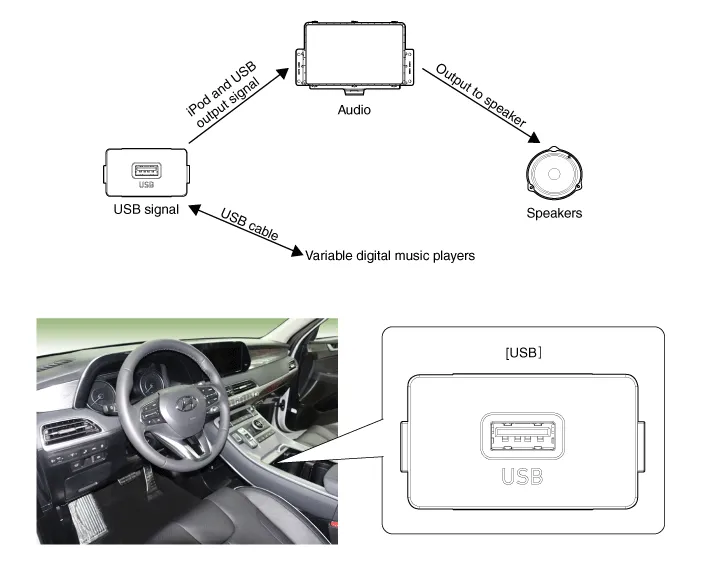
The AUX, iPod and USB JACK on the center console is for customers who like to
listen to external portable music players like the MP3, iPod, earphone, USB
memory stick, CD player and etc., through the vehicle's sound system when it
is linked to this jack.
If sound distortion occurs it may be due to a mismatch of specifications between
units.
Repair procedures
| Removal |
| 1. |
Disconnect the negative (-) battery terminal.
|
| 2. |
Remove the front console assembly.
(Refer to Body - Floor Console Assembly")
|
| 3. |
Remove the front console garnish (A).
|


| 4. |
Remove the front console tray assembly (A).
|

| 5. |
Disconnect the connector (A).
|

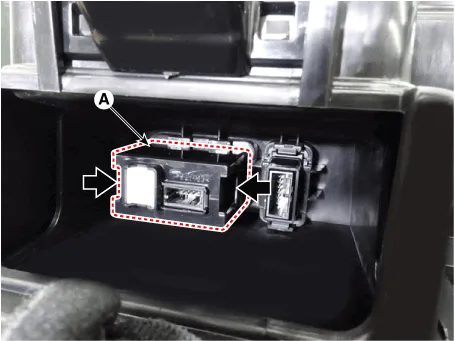
| 6. |
Remove the USB (A) by pushing the fixed clip in the direction of the
arrow as lillustration below.
|
| Installation |
| 1. |
Install the USB.
|
| 2. |
Install the front console assembly.
|
| 3. |
Connect the negative (-) battery connector.
|
Components and components location Components Repair procedures Removal 1. Disconnct the negative (-) battery terminal.
Other information:
Hyundai Palisade (LX2) 2020-2026 Service Manual: Specifications
Specification Air Conditioner Item Specification Compressor Type 7VSX18 (External Variable Displacement Swash Plate) Oil type & Capacity PAG 180 ± 10cc (6.
Hyundai Palisade (LX2) 2020-2026 Service Manual: Temperature Control Actuator
Description and operation Description The heater unit includes mode control actuator and temperature control actuator. The temperature control actuator is located at the heater unit. It regulates the temperature by the procedure as follows.
Categories
- Manuals Home
- Hyundai Palisade Owners Manual
- Hyundai Palisade Service Manual
- Emergency liftgate safety release
- How to reset the power liftgate
- Engine Control/Fuel System
- New on site
- Most important about car

Copyright © 2026 www.hpalisadelx.com - 0.0235