
Hyundai Palisade (LX2): Smart Key / Unlocking your vehicle
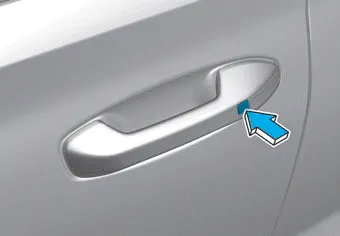
To unlock your vehicle:
1.Make sure you have the smart key in your possession.
2.Press either the button on the door handle or the Door Unlock button (2) on the smart key. The driver's door will unlock and the hazard warning lights will blink two times.
Two Press Unlock Feature
The priority for unlocking the driver door only, or unlocking all the doors with one press may be adjusted in the User Settings mode in the cluster LCD display.
The Two Press Unlock feature, when enabled, will require the user to press the door unlock button once for driver door only and twice for unlocking all the doors.
Select or Deselect the Two Press Unlock feature in the User Settings mode in the cluster LCD display. The option can be found under the following menu:
User Settings âžž Door âžž Two Press Unlock
The Two Press Unlock feature can also be enabled or disabled by pressing the door lock and unlock buttons simultaneously on the Key FOB:
Press and hold both the Door Lock button and the Door Unlock button simultaneously until the hazard warning lights blink.
This will enable or disable the Two Press Unlock feature. Repeat this procedure to enable/disable the mode again.
Information
- The door handle buttons will only operate when the smart key is within 28-40 inches (0.7~1m) from the outside door handle.
- Either the driver or front passenger door can be opened with the door handle button when the smart key is within this range.
- If you press the front passenger outside door handle with the smart key in your possession, all the doors will unlock.
To lock your vehicle using the door handle button or the Smart Key: 1.Make sure all doors, the hood and the liftgate are closed. 2.Make sure you have the smart key in your possession.
You can start the vehicle using the remote start button (4) of the smart key. To start the vehicle remotely : - Lock the doors by pressing the door lock button (1) within 32 ft (10 m) distance from the vehicle.
Other information:
Hyundai Palisade (LX2) 2020-2026 Service Manual: Repair procedures
Variant Coding When you need variant coding: – Replace Front View Camera with a new one ※ EOL Variant Coding and calibration required for new replacement Front View Camera Variant Coding
Hyundai Palisade (LX2) 2020-2026 Service Manual: Smart Cruise Control (SCC) Switch
Components and components location Components 1. Remote control switch (Audio swtich) 2. Remote control switch (Cruise control switch) Schematic diagrams Circuit Diagram Trip + SCC Repair procedures Removal 1.
Categories
- Manuals Home
- Hyundai Palisade Owners Manual
- Hyundai Palisade Service Manual
- Resetting the Driver's Seat Memory System
- How to reset the power liftgate
- Automatic Transaxle Fluid (ATF)
- New on site
- Most important about car
