
Hyundai Palisade (LX2): Body Side Molding / Roof Rack
Components and components location
| Components Location |
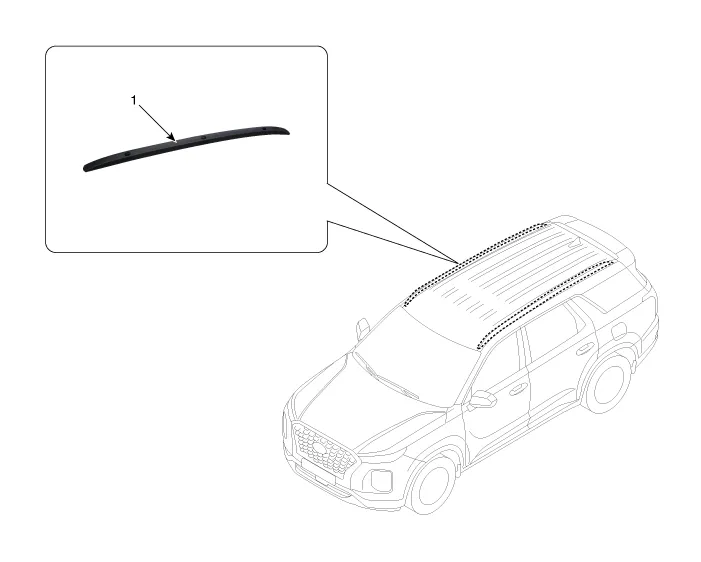
| 1. Roof rack assembly |
Repair procedures
| Removal |
|

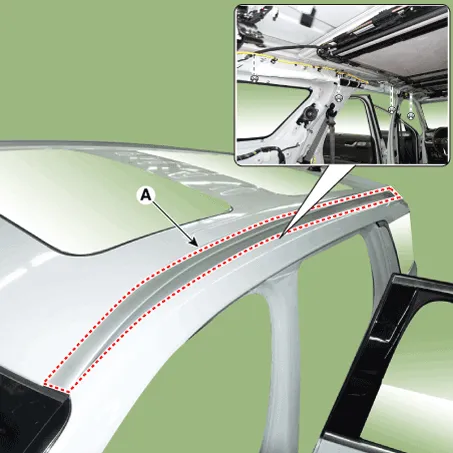
| 1. |
Loosen the nuts and remove the roof rack assembly (A).
|
| 2. |
To install, reverse removal procedure.
|
Repair procedures Replacement • When removing with a flat-tip screwdriver or remover, wrap protective tape around the tools to prevent damage to components.
Repair procedures Replacement • When removing with a flat-tip screwdriver or remover, wrap protective tape around the tools to prevent damage to components.
Other information:
Hyundai Palisade (LX2) 2020-2026 Service Manual: Schematic diagrams
Trouble Symptom Charts Component Parts and Function Outline Component part Function Cruise Control Switch Input the set speed and distance to the SCC ECU. Instrument Cluster Display various information inputted from SCC.
Hyundai Palisade (LX2) 2020-2026 Service Manual: Troubleshooting
Diagnosis with Diagnostic tool 1. In the body electrical system, failure can be quickly diagnosed by using the vehicle diagnostic system (Diagnostic tool). The diagnostic system (Diagnostic tool) provides the following information.
Categories
- Manuals Home
- Hyundai Palisade Owners Manual
- Hyundai Palisade Service Manual
- Automatic Transaxle System (A8LF1)
- Electrochromatic Mirror (ECM) with homelink system
- Identification Numbers
- New on site
- Most important about car
