
Hyundai Palisade (LX2): Smart Key / Battery replacement
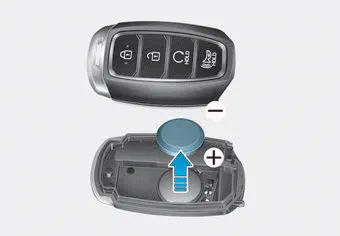
If the Smart Key is not working properly, try replacing the battery with a new one.
Battery Type: CR2032 To replace the battery:
1.Remove the mechanical key.
2.Use a slim tool to pry open the rear cover of the smart key.
3.Remove the old battery and insert the new battery. Make sure the battery position is correct.
4.Reinstall the rear cover of the smart key.
If you suspect your smart key might have sustained some damage, or you feel your smart key is not working correctly, contact an authorized HYUNDAI dealer.
Information
An inappropriately disposed battery can be harmful to the environment and human health. Dispose of the battery according to your local law(s) or regulations.
Loss of a smart key A maximum of two Smart Keys can be registered to a single vehicle. If you happen to lose your smart key, you should immediately take the vehicle and remaining keys to your authorized HYUNDAI dealer or tow the vehicle, if necessary.
The immobilizer system protects your vehicle from theft. If an improperly coded key (or other device) is used, the engine's fuel system is disabled.
Other information:
Hyundai Palisade (LX2) 2020-2026 Service Manual: Refrigerant Line
Components and components location Components [Isometric view] 1. Front suction & Liquid pipe assembly [Top view] 1. Front suction & Liquid pipe assembly Repair procedures Replacement [Front suction & Liquid pipe assem
Hyundai Palisade (LX2) 2020-2026 Service Manual: Front Radar Unit
Specifications Specification Item Specification Power supply (V) 12 Operation voltage (V) 9 - 16 Description and operation Description The smart cruise control unit is installed on the front right-hand side of the chass
Categories
- Manuals Home
- Hyundai Palisade Owners Manual
- Hyundai Palisade Service Manual
- Electronic Child Safety Lock System
- Resetting the Driver's Seat Memory System
- Repair procedures
- New on site
- Most important about car
