
Hyundai Palisade (LX2): LCD Display (Cluster type A and type B) / LCD Display Modes
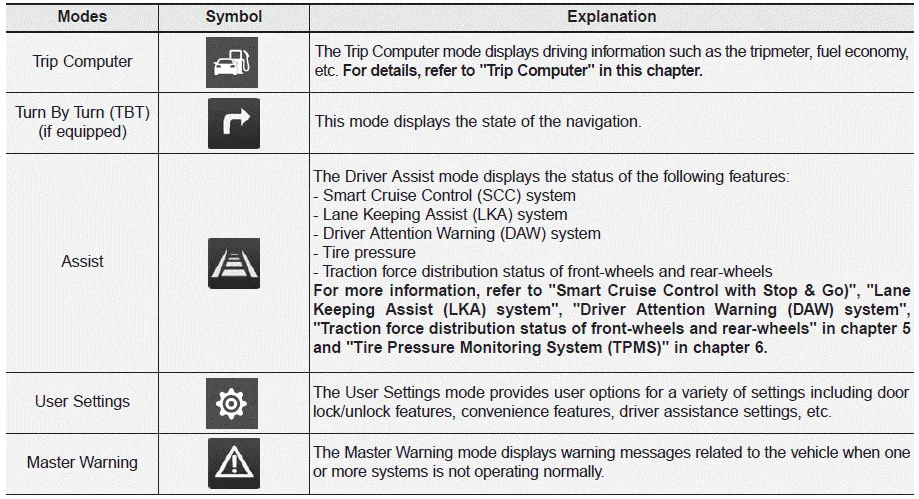
LCD Display Control The LCD display modes can be changed by using the control buttons. (1) : MODE button for changing modes (2) , : MOVE switch for changing items (3) OK : SELECT/RESET button for setting or resetting the selected item
Trip computer mode The trip computer mode displays information related to vehicle driving parameters including fuel economy, tripmeter information and vehicle speed.
Other information:
Hyundai Palisade (LX2) 2020-2026 Service Manual: Compressor
Description and operation Description The compressor is the power unit of the A/C system. It is located on the side of engine block and driven by a V-belt of the engine. The compressor changes low pressure and low temperature refrigerant gas into high pressure and high temperature refrigerant gas.
Hyundai Palisade (LX2) 2020-2026 Service Manual: Cluster Ionizer
Description and operation Description The cluster ionizer makes disinfection and decomposition of bad smell from the air-conditioner or inflow air. And it cleans the inside air of a vehicle. When the ignition switch is ON, the ionizer runs "CLEAN" mode and then "ION" mode, switching between both modes.
Categories
- Manuals Home
- Hyundai Palisade Owners Manual
- Hyundai Palisade Service Manual
- Convenient Features of Your Vehicle
- Rear Heater Unit
- Engine Control/Fuel System
- New on site
- Most important about car
