
Hyundai Palisade (LX2): Blind-Spot Collision Warning/ Blind-Spot Collision-Avoidance Assist / Warning and System Control
Blind-Spot Collision Warning (BCW) system
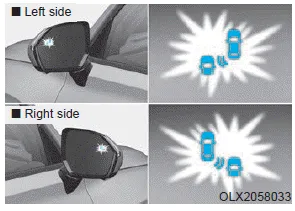
First stage alert
If a vehicle is detected within the boundary of the system, a warning light will illuminate on the outer side view mirror and the head up display (if equipped).
If the detected vehicle is no longer within the blind spot area, the warning will turn off according to the driving conditions of the vehicle.
â– Left side
â– Right side
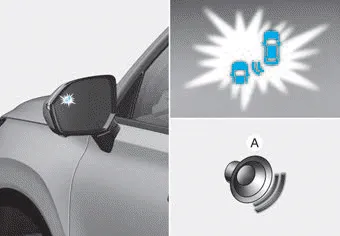
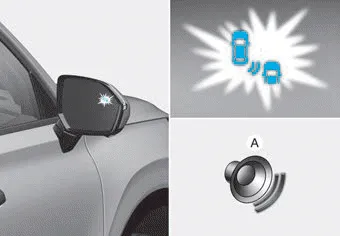
Second stage alert
A warning chime to alert the driver will activate when:
1. A vehicle has been detected in the blind spot area by the radar system AND.
2. The turn signal is applied (same side as where the vehicle is being detected).
When this alert is activated, the warning light on the outer side view mirror and the head up display (if equipped) will also blink. And a warning chime will sound.
If you turn off the turn signal indicator, the second stage alert will be deactivated.
If the detected vehicle is no longer within the blind spot area, the warning will turn off according to the driving conditions of the vehicle.
WARNING
- The warning light on the outer side view mirror will illuminate whenever a vehicle is detected at the rear side by the system. To avoid accidents, do not focus only on the warning light and neglect to see the surroundings of the vehicle.
- Drive safely even though the vehicle is equipped with a Blind-Spot Collision Warning (BCW) system. Do not solely rely on the system but check your surroundings before changing lanes or backing the vehicle up.
- The system may not alert the driver in some situations due to system limitations so always check your surroundings while driving.
CAUTION
- Always pay attention to road and traffic conditions while driving, whether or not the warning light on the outer side view mirror illuminates or there is a warning alarm.
- Playing the vehicle audio system at high volume may prevent occupants from hearing the Blind-Spot Collision Warning system warning sounds.
- If any other warning sound such as seat belt warning chime is already generated, the Blind-Spot Collision Warning (BCW) system warning may not sound.
Blind-Spot Collision-Avoidance Assist (BCA) system

The Blind-Spot Collision-Avoidance Assist (BCA) system may apply braking power, when an approaching vehicle is detected within a certain distance next to or behind your vehicle.
In this situation, the system gently apply braking power on the tire, which is located in the opposite side of the possible-colliding point. The instrument cluster will inform the driver of the system activation.
Blind-Spot Collision-Avoidance Assist (BCA) system is automatically deactivated when:
- The vehicle drives a certain distance
away
- The vehicle direction is changed
against the possible-colliding point
- The steering wheel is abruptly
moved
- The brake pedal is depressed
- After a certain period of time
The driver should drive the vehicle in the middle of the vehicle lanes to keep the system in the ready status.
When the vehicle drives too close to one side of the vehicle lanes, the system may not properly operate.
In addition, the system may not properly control your vehicle in accordance with driving situations. Thus, always pay close attention to road conditions.
WARNING
- The driver is responsible for accurate steering.
- Do not unnecessarily operate the steering wheel, when the Blind-Spot Collision-Avoidance Assist System is in operation.
- Always pay attention to road and traffic conditions while driving. The Blind-Spot Collision-Avoidance Assist system may not operate or unnecessarily operate depending on certain situations.
- The Blind-Spot Collision- Avoidance Assist system is not a substitute for safe driving practices, but is a supplemental system only. It is the responsibility of the driver to always drive cautiously to prevent unexpected and sudden situations from occurring. Pay attention to road conditions at all times.
System setting • Setting Blind-Spot Safety function The driver can activate the system by placing the ignition switch to the ON position and by selecting 'User Settings → Driver Assistance → Blind-Spot Safety' - BCA and BCW turn on and are ready to be operated when 'Active Assist' is selected.
â– Front camera â– Rear radar Front camera The front camera function as a sensor detecting the lane. If the sensor is covered with snow, rain or foreign substance, the system may temporarily be canceled and not work properly.
Other information:
Hyundai Palisade (LX2) 2020-2026 Service Manual: Rear Blower Motor
Repair procedures Replacement 1. Disconnect the negative (-) battery terminal. 2. Remove the luggage side trim (Refer to Body - "Luggage Side Trim ") 3. Separate the rear blower motor connector (A), loosen the mounting screws and remov
Hyundai Palisade (LX2) 2020-2026 Service Manual: Cruise Control (CC) Switch
Components and components location Components 1. Remote control switch (Audio swtich) 2. Remote control switch (Cruise control switch) Schematic diagrams Circuit Diagram Repair procedures Removal 1.
Categories
- Manuals Home
- Hyundai Palisade Owners Manual
- Hyundai Palisade Service Manual
- Components and components location
- How to reset the power liftgate
- Body (Interior and Exterior)
- New on site
- Most important about car
