
Hyundai Palisade (LX2): Driver Assist System / Surround View Monitoring
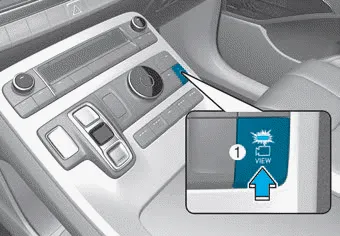
The Surround View Monitoring system can assist in parking by allowing the driver to see around the vehicle.
Push the button (1, indicator ON) to operate the system. To cancel the system, push the button again (1, indicator OFF).
The system is activated when:
- The engine is ON
- The shift button is in D (Drive), N (Neutral) or R (Reverse)
- Vehicle speed is under 10 mph (15 km/h)
The system is deactivated when:
- You press the button (1) again
- Vehicle speed is over 10 mph (15 km/h)
Information
- When vehicle speed is over 10 mph (15 km/h), the system will turn off. The system will not automatically turn on again, even though vehicle speed gets below 10 mph (15 km/h). Push the button (1, indicator ON) again, to turn on the system.
- When the vehicle is backing up, the system will turn ON regardless of vehicle speed or button status. However, if vehicle speed is over 10 mph (15 km/h) when driving forward, the SVM system will turn off.
- A warning appears on the system when: - The liftgate is opened - The driver's door is opened - The passenger's door is opened - The outer side view mirror is folded
- If the system is not operating normally, the system should be checked by an authorized HYUNDAI dealer.
CAUTION
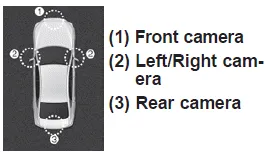
Surround View Monitor system only serves to assist the driver in parking. ALWAYS look around your vehicle to make sure there are no objects or obstacles before moving the vehicle.
NOTICE
Always keep the camera lens clean. The camera may not work normally if the lens is covered with foreign material.
The Rear View Monitor will activate when the engine is running and the shift button is in the R (Reverse) position. This is a supplemental system that helps provide a view of the area behind the vehicle through the infotainment system screen while the vehicle is in the R (Reverse) position.
â– Type B â– Type C - Driver-side â– Type C - Passenger-side BVM (Blind-spot View Monitor) system displays the driver-side or passenger- side rear areas in the cluster when the system is activated.
Other information:
Hyundai Palisade (LX2) 2020-2026 Service Manual: Rear Heater Unit
Components and components location Component Location 1. Rear Heater & A/C Unit Repair procedures Replacement • Be careful not to damage the parts located under the vehicle
Hyundai Palisade (LX2) 2020-2026 Service Manual: Heater & A/C Control Unit (Rear)
Components and components location Component Connector Pin Function Connector PIN No Pin Function Connector PIN No Pin Function A 1 Battery A 17 IGN2 2
Categories
- Manuals Home
- Hyundai Palisade Owners Manual
- Hyundai Palisade Service Manual
- Engine Electrical System
- Electrochromatic Mirror (ECM) with homelink system
- Removing and Storing the Spare Tire
- New on site
- Most important about car
